The Uconnect system in your Jeep Wrangler allows for seamless Bluetooth connectivity, enabling you to enjoy hands-free calling, music streaming, and more. Establishing a Bluetooth connection is straightforward, and this guide will walk you through the process.
With the Uconnect system, you can easily pair your device with your vehicle’s entertainment system. This not only enhances your driving experience but also ensures your safety on the road by minimizing distractions.
Key Takeaways
- Understand the Uconnect system and its capabilities.
- Learn the simple steps to establish a Bluetooth connection in your Jeep Wrangler.
- Discover the benefits of hands-free calling and music streaming.
- Enhance your driving experience with a seamless and safe connection.
- Minimize distractions on the road by using your vehicle’s entertainment system.
Understanding Bluetooth Connectivity in Jeep Wranglers
Understanding Bluetooth connectivity in Jeep Wranglers is essential for maximizing the potential of your vehicle’s infotainment system. Bluetooth technology allows for seamless integration between your Jeep and your smartphone, enabling features such as hands-free calling, music streaming, and more.
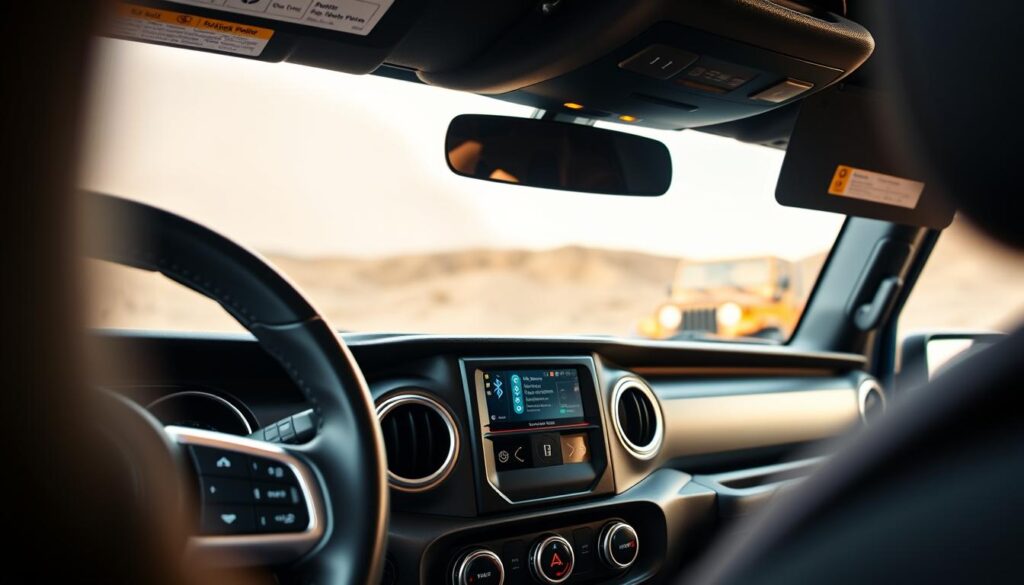
Bluetooth Capabilities Across Different Jeep Wrangler Models
Different Jeep Wrangler models offer varying levels of Bluetooth capabilities. For instance, newer models like the JL and JT series often come equipped with advanced Bluetooth features compared to older models. It’s essential to check your vehicle’s specifications to understand its Bluetooth capabilities.
Uconnect System Overview for JK, JL, and JT Models
The Uconnect system is Jeep’s infotainment platform that integrates Bluetooth connectivity. Across JK, JL, and JT models, the Uconnect system offers a range of features, including Bluetooth pairing, voice commands, and more. Familiarizing yourself with the Uconnect system in your Jeep Wrangler will enhance your Bluetooth experience.
Benefits of Using Bluetooth in Your Jeep
Using Bluetooth in your Jeep Wrangler offers several benefits, including enhanced safety through hands-free calling, the convenience of streaming music directly from your smartphone, and the ability to use voice commands for various functions. These features contribute to a more enjoyable and safer driving experience.
Before You Begin: Preparing for Bluetooth Connection
Ensuring a smooth Bluetooth pairing process involves checking your Jeep Wrangler’s compatibility and your phone’s readiness. This preparatory step is crucial for a successful connection.
Checking Bluetooth Compatibility in Your Jeep Wrangler
First, verify that your Jeep Wrangler is equipped with Bluetooth technology. Most modern Jeep Wrangler models, including JK, JL, and JT, come with Uconnect systems that support Bluetooth connectivity. Check your vehicle’s manual or the manufacturer’s website to confirm compatibility. You can also look for the Bluetooth logo on your vehicle’s infotainment system.
Ensuring Your Phone’s Bluetooth is Ready
Next, ensure your phone’s Bluetooth is enabled and ready to pair. Go to your phone’s settings, find the Bluetooth menu, and turn it on. Make sure your phone is set to discoverable mode to allow your Jeep Wrangler to detect it. It’s also a good idea to update your phone’s operating system to the latest version to avoid any compatibility issues.
Gathering Necessary Information and Materials
Before you start the pairing process, gather the necessary information and materials. This includes your Jeep Wrangler’s manual, your phone’s manual (if needed), and the vehicle’s VIN (Vehicle Identification Number). Having this information handy can help troubleshoot any issues that may arise during the pairing process.
By following these steps, you’ll be well-prepared to connect your Jeep Wrangler to Bluetooth successfully. A little preparation goes a long way in ensuring a seamless and enjoyable driving experience.
How to Connect to Jeep Wrangler Bluetooth: Step-by-Step Guide
Connecting your device to your Jeep Wrangler’s Bluetooth system is a straightforward process that enhances your driving experience. This guide will walk you through the steps to successfully pair your device and enjoy hands-free calls and audio streaming.
Accessing the Bluetooth Menu in Your Jeep
To start the pairing process, you need to access the Bluetooth menu in your Jeep Wrangler. Navigate to the Settings menu on your Uconnect system, then select Bluetooth from the available options. Ensure that Bluetooth is turned on and set to discoverable mode.
Setting Your Phone to Discoverable Mode
On your phone or device, go to the Bluetooth settings and enable discoverable mode. This allows your Jeep’s Uconnect system to detect your device. The exact steps may vary depending on your device’s operating system, but typically, you’ll find this option under Bluetooth settings.
Pairing Your Device with the Jeep’s System
Once your device is in discoverable mode, your Jeep’s Uconnect system should detect it. Select your device’s name from the list of available devices on the Uconnect screen. You may be prompted to confirm a pairing code on both your device and the Uconnect system. Follow the on-screen instructions to complete the pairing process.
Confirming Successful Connection
After pairing, your Uconnect system should confirm that the connection is successful. You can verify this by checking the Bluetooth settings on your device, which should now show that it is connected to your Jeep’s system.
Testing the Connection with Calls and Audio
To ensure that the connection is working properly, make a test call or play some music. This will help you verify that both the audio and hands-free calling features are functioning as expected.
| Step | Description | Status |
|---|---|---|
| 1 | Access Bluetooth Menu | Complete |
| 2 | Set Phone to Discoverable | Complete |
| 3 | Pair Device with Jeep | Complete |
| 4 | Confirm Connection | Complete |
| 5 | Test Connection | Complete |
Troubleshooting Common Bluetooth Connection Issues
Despite the convenience of Bluetooth connectivity, some Jeep Wrangler owners encounter issues that can be addressed through basic troubleshooting. Bluetooth technology has revolutionized the way we connect our devices, but like any technology, it’s not immune to occasional glitches.
Device Not Found or Pairing Failure
If your Jeep Wrangler’s Uconnect system can’t find your device or pairing fails, ensure that your device’s Bluetooth is in discoverable mode. Restart both your device and the Uconnect system, and try pairing again. If issues persist, check for software updates on both your device and the Uconnect system.
Audio Quality Problems
Poor audio quality can be frustrating. Check that your device’s volume is turned up and that the audio is playing through the correct output. Ensure that the Uconnect system’s software is up to date, as updates often improve audio quality. If you’re streaming music, try restarting the streaming app or your device.
Connection Drops or Intermittent Connectivity
Connection drops can be caused by interference from other devices or a weak Bluetooth signal. Try moving your device closer to the Uconnect system or reducing interference from other electronic devices. Restarting both your device and the Uconnect system can also resolve this issue.
| Issue | Troubleshooting Step |
|---|---|
| Device Not Found | Ensure device Bluetooth is discoverable, restart device and Uconnect system |
| Audio Quality Problems | Check device volume, update Uconnect system software |
| Connection Drops | Reduce interference, restart device and Uconnect system |
Updating Your Jeep’s Uconnect System
Regularly updating your Jeep Wrangler’s Uconnect system is crucial for maintaining optimal Bluetooth performance. Updates often include bug fixes and improvements to connectivity and audio quality. To update, visit the official Jeep or Uconnect website, follow the instructions for checking and installing updates, and ensure your vehicle is in a well-ventilated area with a stable internet connection.
“Keeping your Uconnect system updated is key to a seamless Bluetooth experience.” – Jeep Technical Support
Resetting Bluetooth Connections
If you’re experiencing persistent issues, resetting the Bluetooth connection can be a useful troubleshooting step. Go to the Bluetooth settings on your Uconnect system, remove the paired device, and then restart both your device and the Uconnect system before attempting to pair again.
By following these troubleshooting steps, most Bluetooth connection issues in your Jeep Wrangler can be resolved, ensuring a smooth and enjoyable driving experience.
Maximizing Your Jeep Wrangler Bluetooth Experience
To get the most out of your Jeep Wrangler’s Bluetooth capabilities, it’s essential to understand its full potential. Beyond just connecting your device, there are several features and settings that can enhance your overall experience.
Using Voice Commands with Bluetooth
One of the most significant advantages of Bluetooth connectivity in your Jeep Wrangler is the ability to use voice commands. This feature allows you to make hands-free calls, play music, and even control certain vehicle functions without taking your hands off the wheel or your eyes off the road. To use voice commands, simply press the voice button on your steering wheel and follow the prompts.
Managing Multiple Paired Devices
If you frequently switch between different devices or have multiple passengers who want to connect their devices, managing multiple paired devices is crucial. Your Jeep Wrangler’s Bluetooth system allows you to pair multiple devices, and you can switch between them easily through the Uconnect system. To manage paired devices, go to the Bluetooth settings menu and select “Paired Devices” to view, add, or remove devices.
Disconnecting and Removing Paired Devices
Occasionally, you may need to disconnect or remove a paired device from your Jeep Wrangler’s Bluetooth system. This can be useful if you’re having connectivity issues or if you’re selling your vehicle. To remove a paired device, navigate to the Bluetooth settings, select the device you want to remove, and choose the “Forget Device” or “Remove Device” option.
| Feature | Description | Benefit |
|---|---|---|
| Voice Commands | Control your vehicle’s functions and connected devices with voice instructions | Enhanced safety and convenience |
| Multiple Device Pairing | Pair several devices to your Jeep Wrangler’s Bluetooth system | Flexibility for multiple users |
| Bluetooth Apps | Utilize apps compatible with your Jeep Wrangler’s Uconnect system | Expanded functionality and entertainment options |
Bluetooth Apps Compatible with Jeep Wrangler Systems
Several Bluetooth apps are compatible with Jeep Wrangler systems, offering additional features and functionality. These apps can range from music streaming services to navigation tools. To find compatible apps, check the Uconnect store or your device’s app store for options that integrate with your Jeep’s system.
Advanced Bluetooth Features in Newer Models
Newer Jeep Wrangler models often come with advanced Bluetooth features, such as improved voice recognition, enhanced audio quality, and increased connectivity options. If you have a newer model, explore the Uconnect system’s settings to discover what’s available and how to use these features to maximize your Bluetooth experience.
Conclusion
Connecting your device to your Jeep Wrangler’s Bluetooth system is a straightforward process that enhances your driving experience. With the Uconnect system, you can seamlessly integrate your device, ensuring safe and convenient access to your music, calls, and other features.
By following the step-by-step guide outlined in this article, you can easily establish a Jeep Wrangler Bluetooth connection. This not only streamlines your in-car entertainment and communication but also maximizes the potential of your vehicle’s infotainment system.
The Uconnect system is designed to provide a user-friendly interface, making it easy to manage your Bluetooth connections. Whether you’re looking to pair a new device or troubleshoot common issues, understanding how to effectively use your Jeep Wrangler’s Bluetooth capabilities is key to a more enjoyable driving experience.
As you’ve learned, the benefits of using Bluetooth in your Jeep Wrangler include enhanced safety, convenience, and entertainment options. By leveraging these features, you can make the most of your time on the road.
FAQ
How do I know if my Jeep Wrangler is Bluetooth compatible?
You can check your Jeep Wrangler’s Bluetooth compatibility by referring to your vehicle’s manual or contacting a local dealership. Most Jeep Wrangler models from 2012 and later have Bluetooth capabilities.
What is the Uconnect system, and how does it work with Bluetooth?
The Uconnect system is an infotainment system used in Jeep Wrangler models, including JK, JL, and JT. It allows for Bluetooth connectivity, enabling features like hands-free calling and music streaming.
Why is my phone not being detected by my Jeep Wrangler’s Bluetooth system?
Ensure your phone’s Bluetooth is turned on and set to discoverable mode. Restart both your phone and your Jeep’s Uconnect system, then try pairing again.
How do I update my Jeep Wrangler’s Uconnect system?
You can update your Uconnect system by visiting the official FCA or Jeep website, downloading the update to a USB drive, and then installing it through your vehicle’s USB port.
Can I connect multiple devices to my Jeep Wrangler’s Bluetooth system?
Yes, most Jeep Wrangler models allow you to pair multiple devices. However, only one device can be actively connected for audio streaming or hands-free calling at a time.
How do I reset my Jeep Wrangler’s Bluetooth connection?
To reset your Bluetooth connection, go to your Uconnect system’s settings, find the Bluetooth menu, and select “Delete All” or “Reset” to clear paired devices. Then, restart your system and pair your device again.
Are there any Bluetooth apps compatible with Jeep Wrangler systems?
Yes, several Bluetooth apps are compatible with Jeep Wrangler systems, including those for music streaming, navigation, and more. Check your app store for compatible apps.
What are some common issues with Jeep Wrangler Bluetooth connectivity?
Common issues include device pairing failures, poor audio quality, and connection drops. Troubleshooting steps include restarting your devices, checking for software updates, and resetting your Bluetooth connection.
Can I use voice commands with my Jeep Wrangler’s Bluetooth system?
Yes, most Jeep Wrangler models with Uconnect systems support voice commands for hands-free control, allowing you to make calls, play music, and more.